Sound Recorder - MP3 Recorder
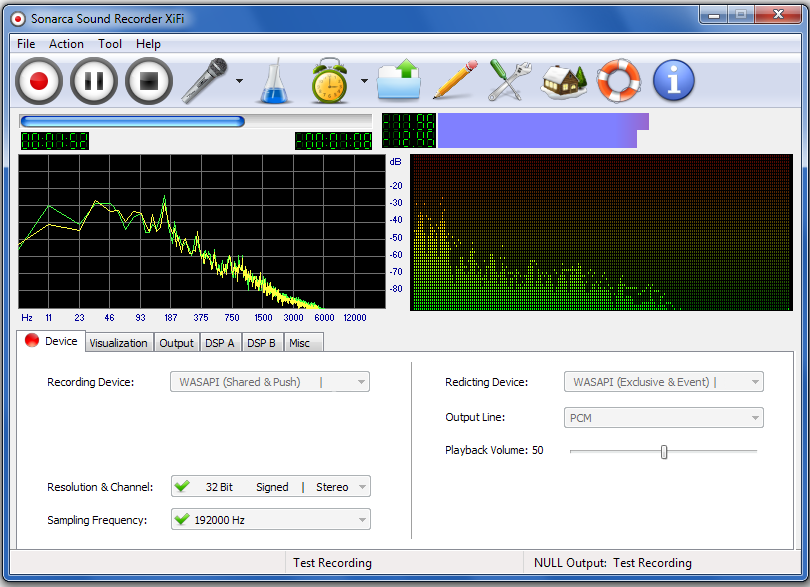
Sonarca Sound Recorder XiFi is a studio quality sound recorder designed for low-latency, high-fidelity, crystal clear sound recording. It supports all mainstream audio interfaces like MME, DirectSound, WASAPI, ASIO, WDM Kernel Streaming. With this high-definition streamlined MP3 recorder, you can easily record various sound input to dozens of audio formats effortlessly.


Key Features
- This sound recorder can record various sound input to dozens of audio formats and hundreds of codecs/subformats.
- Supports MME, DirectSound, WASAPI, ASIO, WDM Kernel Streaming audio interfaces.
- Supports WASAPI loopbak low-latency recording without introducing DAC quality loss.
- Supports WASAPI event/pull styles and exclusive/shared modes
- Can redirect captured sound to a playback device while recording.
- It is capable of bypassing Windows mixer for low-latency recording.
- As a MP3 Recorder, it is capable of saving the recording as the popular MP3 format.
- Supports WAV, MP3, WMA, OGG, APE, FLAC, MP2, VQF, AIFF, AIFC, AIF, 3GP, AAC, M4A, M4B, MP4, MPC, MP+, MPP, WV, AU, SND, RAW, GSM, VOX, PCM, ADPCM, G721, G723, FAP, PAF, SVX, 8SVX, IFF, NIST, IRCAM, SF, VOC, W64, MAT, MAT4, MAT5, PVF, XI, HTK, CAF, SDS, AVR, WAVEX, SD2, WVE, RF64 and user-customized formats etc.
- Supports multiple sound input, audio/video files playback, CD player, line in, microphone, internet radio, even the obsolete tape/VHS cassette or anything else.
- The exclusive customized recording mode allows the users to record sound to customized formats thru their own encoders. Theoretically, Sonarca Sound Recorder can record sound to INFINITE audio formats.
- Studio quality sound recording, supports ultra high sampling frequency up to 1920000 Hz and 24bit/32bit high bit resolution.
- Build-in 64 bit Digital Signal Processing engine, apply frequency filtering/amplitude gain/speed adjustment/earphone enhancement/vocal removal DSP effects to audio data.
- DC Offset Cancellation effect to eliminate unwanted DC hiss noise
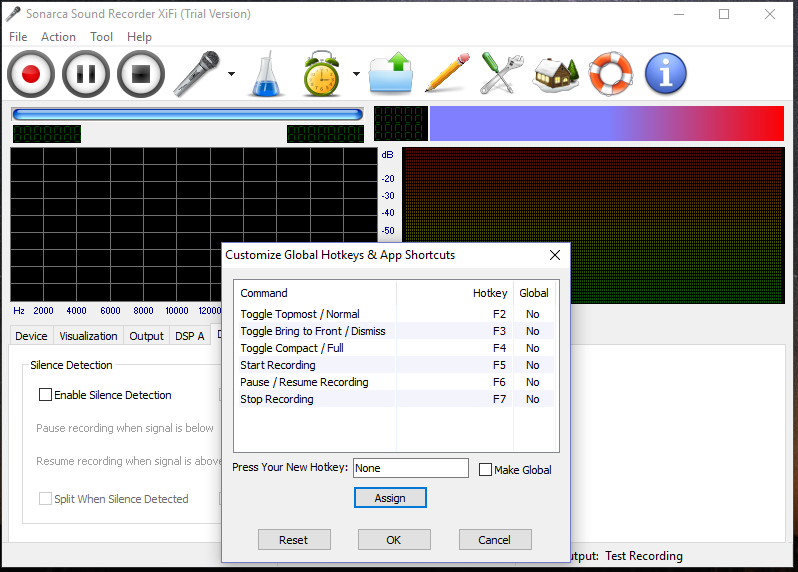
- Fully user-defined global hotkeys & app shortcuts, start recording anywhere.
- Mixer Device/Input Line/Volume control.
- Advanced "Silence Detection" feature enables automatically pausing/resuming sound recording according to sound volume.
- This sound recorder uses the latest Lame MP3 encoder which is generally believed as the the best MP3 encoder.
- Supports three external AAC encoder: FAAC, Nero AAC and CT AAC+.
- Lossless sound recording, supports many modern lossless audio formats such as WAV/WMA Lossless/APE/FALC/AIFF/WavPack etc.
- This Sound Recording supports on-the-fly ripping, in other words, it does not generate temporary files during the ripping process.
- Fully visualize the recording process and realtime display the spectrum of audio data.
- Intuitive recorded file management.
- Build-in audio metadata editor, supports ID3v1/ID3v2/APEv1/APEv2/Vorbis Comment/MPEG4/WMA/WAV/AIFF audio metadata.
- Supports auto-splitting recording mode.
- Handsfree mp3 recording when the scheduler enabled.
- Can make main window topmost.
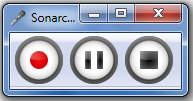
- Full, compact, tray modes.
- Various post-recording actions: Lock/Log Off/Stand By/Hibernate/Restart/Shutdown.
- Diagnose and print detailed sound device info.
- Supports majority of modern sound cards: multi channel/professional/external USB sound cards.
- Supports several sound cards at the same system.
- All events are logged for future diagnosis.
- The last but not the least, this Sound Recorder is Windows 10 compatible and works with Windows 7 (64-bit and 32-bit).
Sound Recorder - Edition Matrix
Feature/Edition |
Sonarca Sound Recorder Free |
Sonarca Sound Recorder XiFi |
|---|---|---|
Audio Interface |
MME |
MME DirectSound WASAPI ASIO WDM Kernel Streaming |
WASAPI Loopback Recording |
 |
 |
Redirect Captured Sound While Recording |
|
|
Low Latency Recording |
|
|
Supported Audio Formats |
CBR MP3 |
32 + Customized Format |
Supports Multiple Sound Input |
|
|
Sound Channels |
Mono Stereo |
Mono Stereo |
Maximum Sampling Frequency |
44100 Hz |
192000 Hz |
Bit Resolution |
8 Bit Unsigned Integer 8 Bit Signed Integer 16 Bit Signed Integer |
8 Bit Unsigned Integer 8 Bit Signed Integer 16 Bit Signed Integer 24 Bit Signed Integer 32 Bit Signed Integer 32 Bit Float Point |
Customized Sound Recording |
|
|
Noise Suppression |
|
Clipping Dithering DC Offset Cancellation |
Digital Signal Processing Effects |
|
frequency filtering |
Compact View Mode |
|
|
Topmost Window |
|
|
User Defined Global Hotkeys
|
|
|
Internal Input Line/Volume control |
|
|
Silence Detection |
|
|
On-the-fly Sound Recording |
|
|
Audio Visualizers |
|
|
Amplitude Bars |
|
|
Amplitude Digit |
|
|
Output File Management |
|
|
Metadata Editor |
|
|
Post-recording Actions |
Do Nothing
Show MessageBox Balloon Notification |
Do Nothing
Show MessageBox Balloon Notification Lock Log Off Standby Hibernate Restart Shutdown |
Scheduler |
|
|
Diagnose and Print Detailed Sound Device Info |
|
|
Supports Multichannel, Professional, External USB Sound Cards. |
|
|
Supports Several Sound Cards at the Same System |
|
|
Write Log |
|
|
Windows 10/8.1/7 Compatible |
|
|
Technical Support |
|
Lifetime* |
Free Update |
|
Lifetime* |
Personal & Private Usage
|
|
|
Public or Commercial Usage
|
|
* |
Price Per Licence |
Freeware |
$29.95 |
* This feature is for registered users only.
Sound Recorder - Windows Vista Missing Device Troubleshooting
Windows Vista made some major changes to audio controls which negatively impact the users ability to record from the sound card. The ability to record from the sound card will be dependent on your system's sound card and drivers. It is important to make sure that you have the latest drivers installed for your sound card. Install the latest drivers before proceeding with these steps.
On some systems you may be able to enable a recording device as follows:
- Open Control Panel
- In classic view, go to Sound
- Go to the Recording tab.
- If you only see "microphone" and/or "line-in", right-click anywhere in the blank white area of the window to display the Show Disabled Devices context menu. Select Show Disabled Devices:
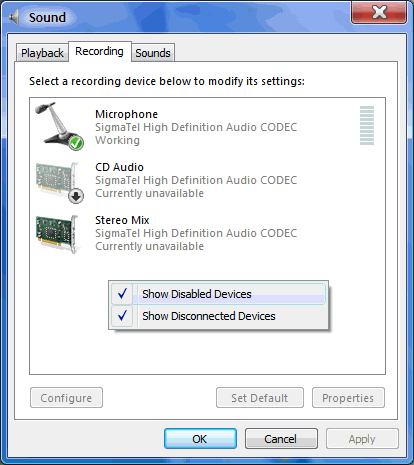
- If Stereo Mix, Wave-Out Mix, Wave, What U Hear, or something similar appears, right click on that entry and choose Enable:
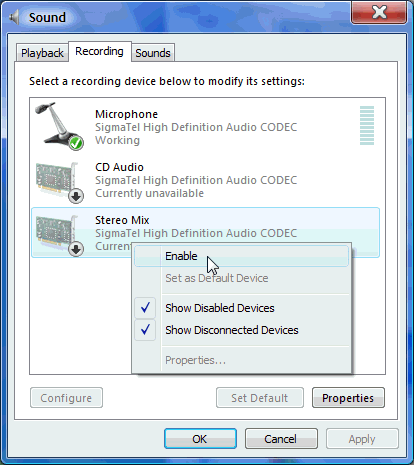
- Click OK - In the case of the example above, we have just enabled the "Stereo Mix" recording device. Keep in mind this is dependent upon your sound card hardware and drivers. You may or may not have this line available.
- To make this newly enabled device the default recording device, highlight it and click the Set Default button, or right-click on the device and select Set as Default Device:
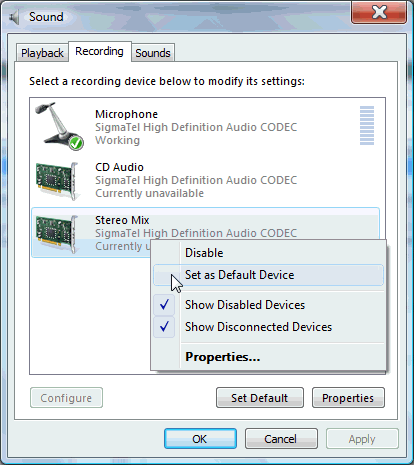
If you were able to successfully enable a recording line, select the appropriate audio device as audio source prior to recording.
Sound Recorder - System Requirements
Minimum System Requirements
- Microsoft Windows 10/Windows 8/Windows 7 (32-bit and 64-bit)
- 1.0 GHz or faster processor
- 512 MB RAM
- 15 MB free hard drive space
- Sound Card
Recommended System Requirements
- Microsoft Windows 10/Windows 8/Windows 7 (64-bit)
- A powerful multi-core processor for smooth sound recording without dropouts, clicking or distortion
- A decent dedicated Sound Card
- Official ASIO driver installed for ASIO recording
- 1 GB RAM
- 15 MB free hard drive space
- Windows Media Player 11 or later
- Administrator Privileges
Download Sound Recorder & MP3 Recorder Now